A key you can hold, for a vault you can’t afford to lose.

This page compares hardware security keys for one job: protecting a KeePassXC database. It focuses on:

  1. Which hardware keys can unlock a KeePassXC database, and how.
  2. Fingerprint unlock: what works and what does not.
  3. Hardware features: interfaces, protocols, secure element and open firmware.
  4. Ecosystem and support: software, mobile apps and Linux.
  5. Warranty, price and firmware update policy.
  6. The security advisory history of each vendor.

Researched November 2026. Prices are approximate, were taken from vendor stores and retailer listings, and should be checked live. Items marked unverified rest on a single weak source or on reading source code.

How KeePassXC uses a hardware key

One mechanism is supported. Knowing which one explains most of the buying advice that follows.

HMAC-SHA1 challenge-response
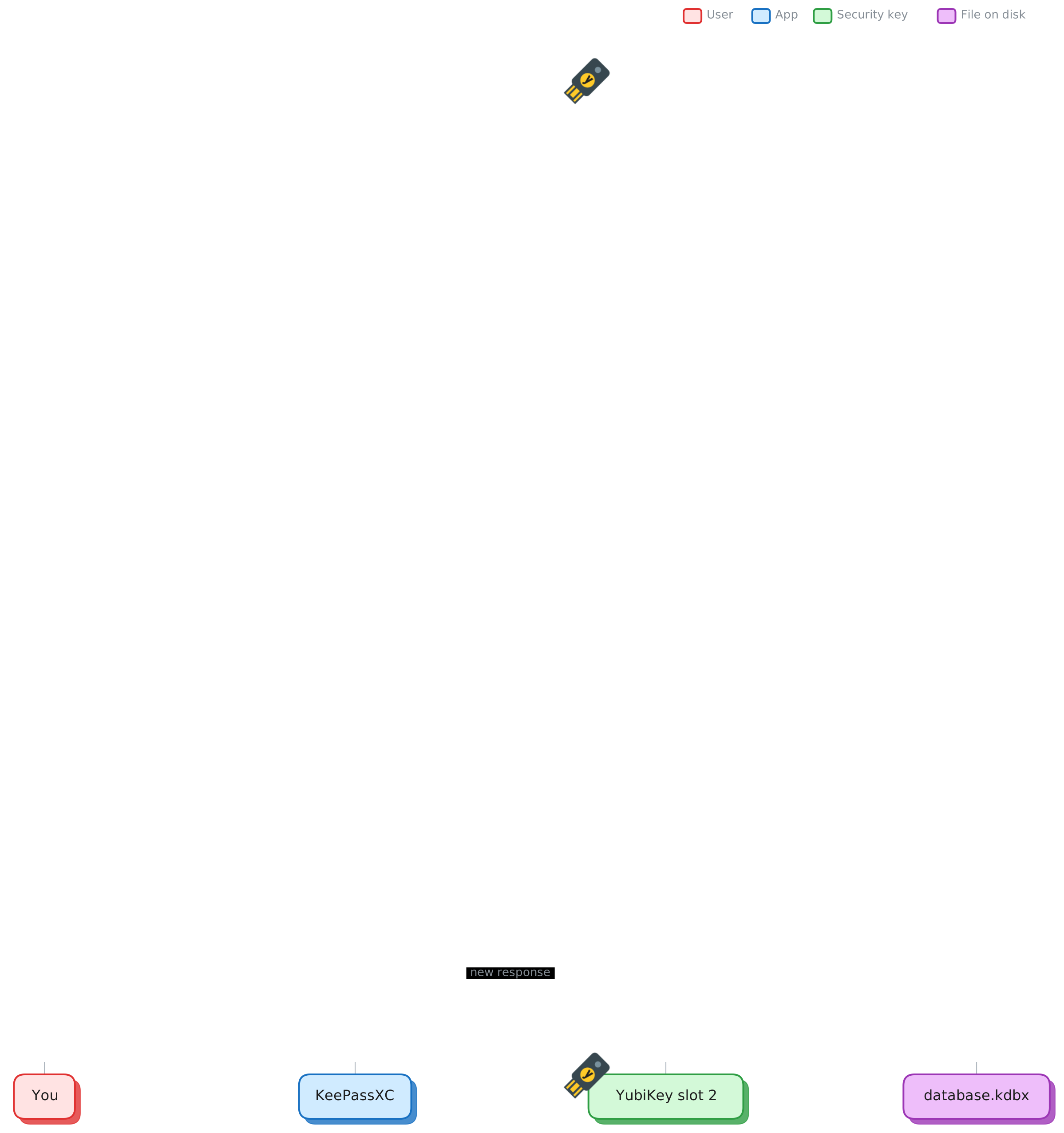
KeePassXC sends the key a random number (the challenge). The key mixes it with a secret that never leaves the key, using the HMAC-SHA1 function, and returns the result (the response). KeePassXC folds that response into the database’s master key. Without the same secret, the response differs and the database stays locked.
  1. KeePassXC creates a challenge.random bytes, new on each save
  2. The key receives it over USB or NFC.a button press may be required
  3. The key computes HMAC-SHA1(secret, challenge).the 20-byte secret stays inside
  4. KeePassXC mixes the response with your password.result: the master key that decrypts the .kdbx file
  • This is the only hardware-key unlock KeePassXC has. It works with YubiKey 5 series, Nitrokey 3 (from KeePassXC 2.7.6), OnlyKey (from 2.5.0), and a Pico-FIDO build with caveats.
  • FIDO2 hmac-secret is not supported. Issue #3560 has been open since 2019, with no assignee, milestone or merged work. The file format holds only one key slot, and FIDO2 keys cannot be cloned, so the change is large.
  • So no fingerprint key unlocks KeePassXC natively. A fingerprint on the key unlocks FIDO2 functions. It cannot answer a challenge-response request. Token2, Feitian, Thetis, Kensington and the YubiKey Bio are all in this group.
  • Fingerprint unlock is supported, through Quick Unlock. The fingerprint comes from your computer’s reader, not from the key. See section 02.
  • Third-party wrappers (t2Vault, FidoVault, fido2kpxc) use FIDO2 hmac-secret so that a fingerprint key can protect a database. They are proofs of concept with no independent review.
  • Buy two keys and give them the same secret. A lost key otherwise means a lost database. A secret generated inside a key cannot be exported, so you must generate your own and write it to both.

Do not confuse this with passkeys. KeePassXC has stored website passkeys since 2.7.7 through its browser extension. That feature keeps your passkeys in the database. It does not unlock the database.

Sequence: you type the password; KeePassXC reads the 32-byte master seed from the database header and sends it to YubiKey slot 2 as the challenge; the key returns a 20-byte HMAC-SHA1 response; KeePassXC combines the seed, response and Argon2-transformed password into the final key and decrypts the entries. On every save a new seed is written, so the key must be present to save.
One unlock, step by step. The challenge is the database’s master seed. It changes on every save, so the key must be plugged in to save as well as to open.
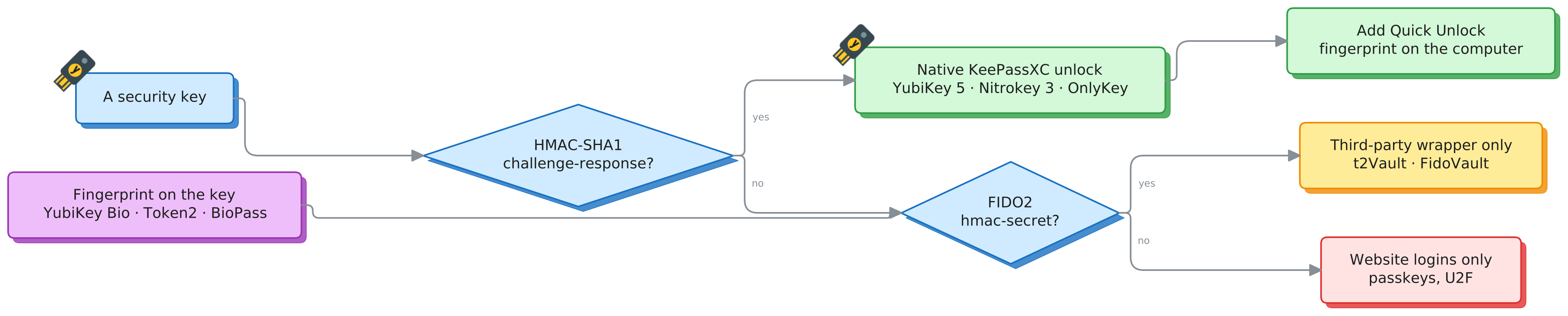
Decision chart: a key with HMAC-SHA1 challenge-response unlocks KeePassXC natively (YubiKey 5, Nitrokey 3, OnlyKey), and Quick Unlock can be added. A key without it but with FIDO2 hmac-secret works only through third-party wrappers (t2Vault, FidoVault). Otherwise it is for website logins only. Fingerprint keys (YubiKey Bio, Token2, BioPass) enter at the FIDO2 question.
Which keys work. One question decides it: does the key support HMAC-SHA1 challenge-response? Fingerprint keys do not, so they fall to the FIDO2 branch.

Fingerprint unlock, the supported way

KeePassXC’s Quick Unlock takes your fingerprint from the computer, not from the key. After one full unlock with your password and key, later unlocks need only a biometric prompt.

“If you are using a hardware key (e.g. YubiKey), it must be connected to your computer to complete the unlock.”

KeePassXC User Guide, Quick Unlock
Linux · main machine

Polkit with fprintd

In KeePassXC
New in 2.8.0 (21 October 2026, PR #8983). KeePassXC asks polkit to confirm it is you. Polkit checks through PAM, and PAM can use fprintd. With no reader, polkit falls back to a password prompt.
Set-up
Install fprintd and enrol a finger with fprintd-enroll. Add auth sufficient pam_fprintd.so near the top of polkit’s PAM file (/etc/pam.d/polkit-1 on Arch). Turn on Quick Unlock under Application Settings, Security.
Which reader to buy
A desktop needs a USB reader, and it must be on the libfprint supported list. Most readers sold for Windows Hello do not work: the Kensington VeriMark Desktop, VeriMark IT and VeriMark Guard are all on the unsupported list. The supported USB readers are mostly older desk models: Digital Persona U.are.U 4000/4500, SecuGen Hamster Pro 20 and UPEK TouchStrip. Check the USB ID (lsusb) of any reader against the list before you rely on it.
macOS · on the side

Touch ID or Apple Watch

In KeePassXC
Supported. Version 2.8.0 adds a fallback to the device password when Touch ID is unavailable.
MacBook
Use the built-in Touch ID sensor. Nothing to buy.
Desktop Mac
A Magic Keyboard with Touch ID (Apple silicon Macs only), or an Apple Watch. A USB fingerprint reader cannot be used for Touch ID.
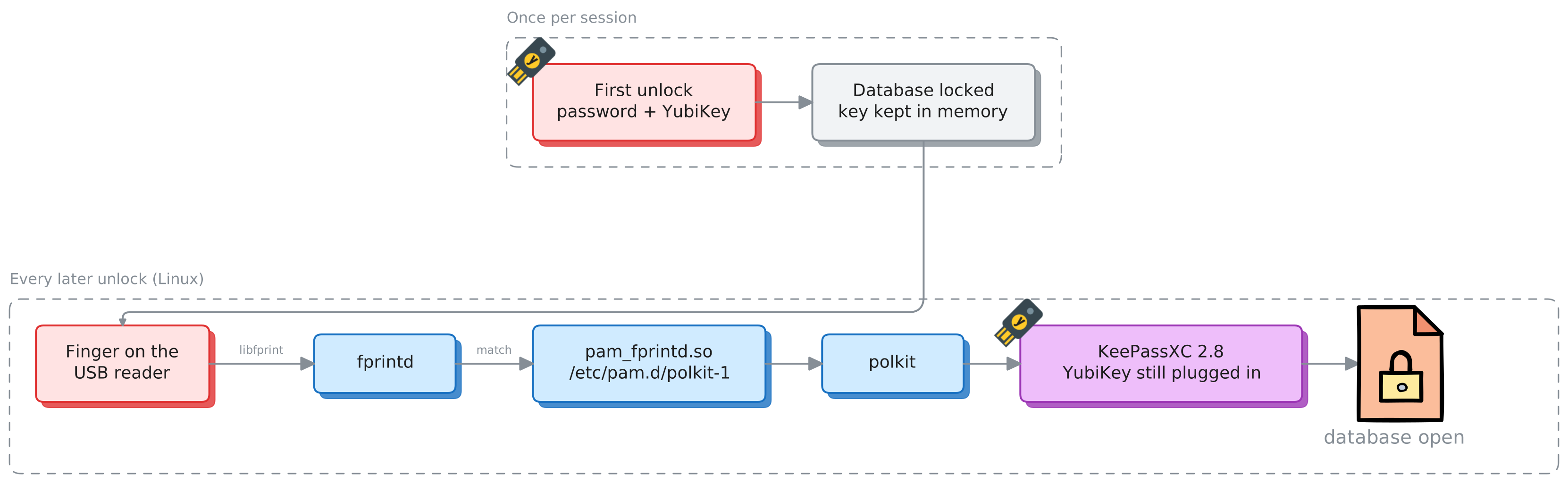
Quick Unlock on Linux. Once per session: first unlock with password and YubiKey, then the database locks with the key kept in memory. Every later unlock: finger on the USB reader, libfprint and fprintd match it, pam_fprintd.so in /etc/pam.d/polkit-1 reports success to polkit, KeePassXC 2.8 (with the YubiKey still plugged in) opens the database.
The Linux chain. KeePassXC asks polkit; polkit asks PAM; pam_fprintd.so asks fprintd, which reads the USB reader through libfprint. The YubiKey must still be plugged in.

One key for both machines. The YubiKey works with KeePassXC on Linux and macOS. Quick Unlock is set up separately on each machine, and the USB reader only helps on Linux.

Not part of this path: the reader on a fingerprint security key (YubiKey Bio, Token2 Bio, Feitian BioPass). Those keys support FIDO2 only. They cannot answer KeePassXC’s challenge-response request, so their reader cannot unlock a database.

What a key does not protect against

A security key protects the database file. It cannot fully protect you once an attacker runs programs as your user, for example after an SSH login with stolen credentials.

This protects you

Touch-required

Without touch, any program running as your user can send a challenge to the plugged-in key and get the response. The attacker then needs only your password.

With touch, every response needs a person at the machine. A remote attacker cannot produce one alone.

This adds nothing here

A fingerprint

Touch already proves that a person is present. A fingerprint proves which person. That matters only against someone at your desk, not against a remote attacker.

Quick Unlock is not a second factor. It releases a key that KeePassXC already holds in memory after the first full unlock.

This still works for an attacker

Waiting for you

  • Replace the program. Put a modified keepassxc earlier in your PATH (for example ~/.local/bin) or edit its desktop launcher. You type the password and touch the key for their copy. With both, any copy of the .kdbx taken before the next save decrypts offline.
  • Ask an open database. While the database is unlocked, Secret Service (the D-Bus password API) and browser integration answer other programs, subject to their confirmation settings.
  • Read input. On X11 any program can read keystrokes, the clipboard and auto-type.
  • Become root. A logged sudo password gives root, and root can read KeePassXC’s memory.

Already blocked: reading the memory of a running KeePassXC. On Linux it marks its process non-dumpable (PR_SET_DUMPABLE 0), so other programs running as your user cannot attach to it or read /proc/<pid>/mem. The Snap build skips this. On macOS it uses PT_DENY_ATTACH.

What reduces the risk

Touch on slot 2
Program the key with ykman otp chalresp --touch 2. This is the most important setting.
Lock early
In Application Settings, Security: lock databases after a short inactivity time, and when the session is locked. A locked database answers nothing.
Wayland, not X11
Makes keystroke logging and clipboard reading by other programs harder.
Fewer integrations
Turn off Secret Service and browser integration if you do not use them. If you use them, keep the access confirmation prompts on.
Known binary
Install from your package manager, not as a Snap. Check that command -v keepassxc prints /usr/bin/keepassxc.
SSH keys on the key
ssh-keygen -t ed25519-sk -O verify-required. The private key never leaves the hardware, and each use needs a touch and a PIN.
Separate the vault
Run KeePassXC as another user, in a VM, or on Qubes OS (a desktop OS that runs each task in its own VM). This is the only option that stops an attacker who controls your normal account. It also changes how you use the desktop every day.

The verdict

Four answers, depending on what you value. Each caveat comes from the research below, not from marketing.

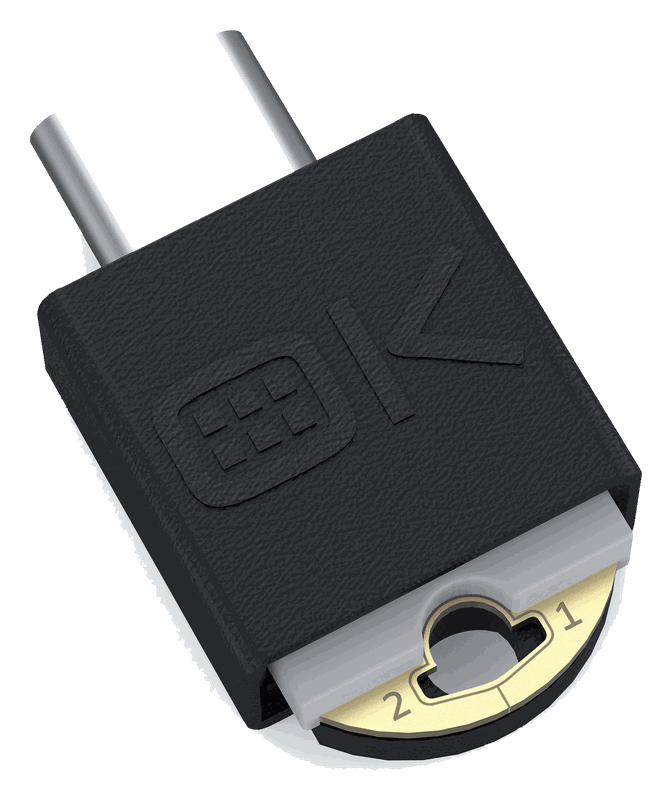
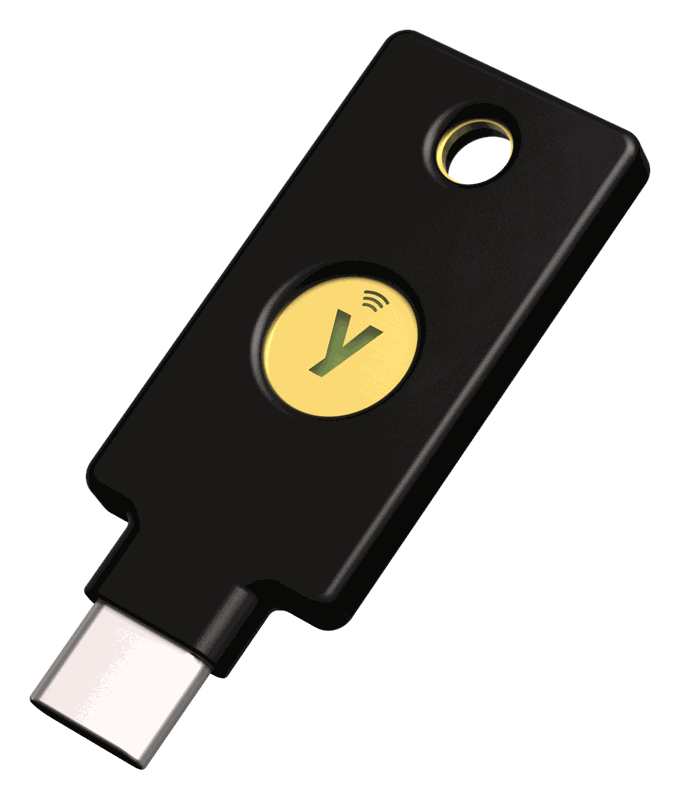
YubiKey 5C NFC
Best overall

YubiKey 5C NFC, bought as a pair

It is the only option that is good on every axis a KeePassXC user meets in practice: phone apps, a touch prompt, and a long-running ecosystem of tools. Two keys cost about US$128 at the Yubico store, or roughly AUD 180 to 215 at Australian retailers (AUD 90 to 108 each, by listing).

Reasons

  • Best mobile support: KeePassDX and Keepass2Android on Android, Strongbox and KeePassium on iOS over NFC.
  • Touch can be required on the challenge-response slot when you program it.
  • Mature ecosystem. Advisories are published, and the ROCA and 2019 FIPS flaws came with replacement programmes.

Caveats

  • Firmware cannot be updated, so check the version on arrival. Aim for 5.7 or later to be outside the EUCLEAK exposure.
  • Closed-source firmware.
  • EUCLEAK (2024) had no replacement programme for older firmware.
  • Consumer warranty text was not retrieved. It is probably one year unverified.
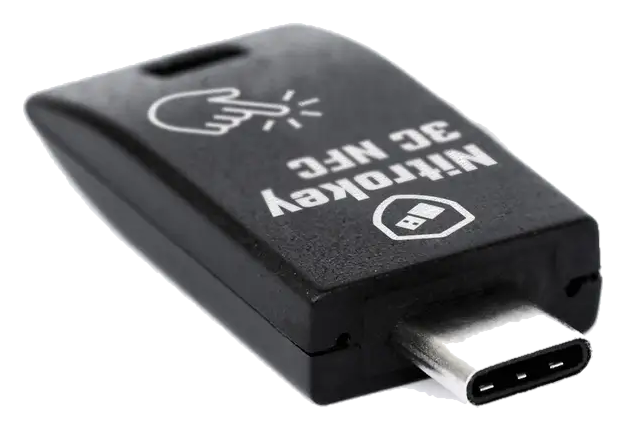
Nitrokey 3C NFC
Open-source pick

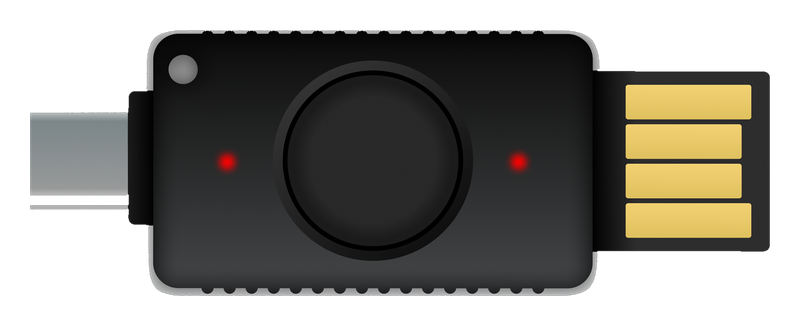
Nitrokey 3C NFC

Reasons

  • Open hardware and firmware.
  • Firmware is updatable, with releases through September 2026.

Caveats

  • One HMAC secret is documented. The vendor’s own README implies two slots, so the sources conflict.
  • From reading the source code, it answers with no touch and no PIN not tested on hardware.
  • Weak mobile support. KeePassDX does not recognise it (open issue).
  • NFC hardware was revised in autumn 2026. Buy units shipped after about September or October.
OnlyKey DUO
Niche, with caution

OnlyKey

Upsides

  • An on-device PIN pad and button. A button press is the default for challenge-response.
  • Wipes after 10 wrong PINs. Open firmware.

Caveats

  • Firmware had no commits from November 2022 until September 2026. Version 3.1.0 is in the repository but not yet a tagged release.
  • No warranty is described, only a 30-day return window.
  • No independent audit, no NFC, and mobile support is unconfirmed.
YubiKey 5C NFC
If you want a fingerprint

YubiKey 5C NFC plus Quick Unlock: touch the key, then your fingerprint.

A fingerprint reader on the key itself cannot unlock KeePassXC, because no fingerprint key can answer its challenge-response request. A fingerprint still works, through Quick Unlock. After one full unlock (password plus key), later unlocks need only a biometric prompt: polkit with fprintd on Linux (new in KeePassXC 2.8.0), or Touch ID on macOS. The YubiKey must stay connected to finish the unlock, as the User Guide says. In daily use that is key plus fingerprint. On a Linux desktop that needs a libfprint-supported USB reader (section 02).

If you want to experiment with a fingerprint key anyway, the Token2 PIN+ Bio3 is the best value of the group (US$41.31, 29 fingerprints), paired with the proof-of-concept t2Vault wrapper.
The contenders

Three vendors make keys that unlock KeePassXC natively. Pick a model in each section to see its image and specifications.

Protocol coverage

Which functions each main model offers, as stated in the model data below. KeePassXC needs only the highlighted column. Scroll sideways on a narrow screen.

Model HMAC-SHA1 challenge-responseThe one KeePassXC needs FIDO2 OATH TOTP OpenPGP PIV On-key fingerprint

The FIDO-only field

These keys are good at passkeys and website logins. None of them offers HMAC-SHA1 challenge-response in the form KeePassXC needs, so none can unlock a database. The fingerprint models are marked.

Pico Keys (pico-fido): the DIY exception

An open-source firmware (AGPLv3, release v8.0 of 23 August 2026) for RP2040, RP2350 or ESP32-S3 boards costing about US$5 to 15. Its source defines HMAC-SHA1 challenge-response, and a bug report (issue #303, closed 2 November 2026) says it works with KeePassXC.

It is the only key outside Yubico, Nitrokey and OnlyKey with reported working challenge-response. It works with caveats.

  • KeePassXC detection and hang bugs recurred through 2025 and 2026. The latest fix landed on 2 November 2026.
  • The RP2040 has no secure boot or flash encryption. The README says keys can be dumped if the board is stolen. RP2350 and ESP32-S3 support secure boot.
  • A Yubico VID/PID build was used in the reported test. The README says not to distribute binaries with a VID/PID you do not own.
  • No fingerprint sensor, no FIDO certification. Only suitable if you also keep the HMAC secret backed up offline.

Also seen, but not covered in depth: the Trezor Safe 3, 5 and 7 (FIDO2 only, no fingerprint, a poor fit for this job), the SecuGen Unity 20 and AuthenTrend ATKey.Pro (fingerprint FIDO2 keys whose KeePassXC support was not checked), and Ledger (no fingerprint sensor and no KeePassXC mechanism found).

At a glance

Every model in one table. Filter with the toggles, and select a column heading to sort. On a narrow screen the table scrolls sideways and the model name stays in view.

Yes Partial No Unverified

About the fingerprint column. It describes a reader on the key. Fingerprint unlock of KeePassXC is available with any key marked Yes under KeePassXC unlock, using Quick Unlock and your computer’s fingerprint reader (polkit and fprintd on Linux from 2.8.0, Touch ID on macOS). The key must stay plugged in.

“Works with KeePassXC” includes the partial match (Pico-FIDO). Price sorting converts EUR at about 1.1 and AUD at about 0.65 to US dollars, for ordering only. Prices are approximate and were captured in November 2026. The advisory column names the latest hardware advisory I found for each model, not a guarantee that none exist.

Security and update history

Flaws, recalls and firmware milestones across vendors. How a vendor responded matters as much as whether a flaw occurred.

      Buying advice from the history. Firmware cannot be updated on any YubiKey, so old retail stock can carry pre-5.7 firmware that is inside the EUCLEAK exposure. Check with ykman info or Yubico Authenticator. Whether EUCLEAK affects HMAC-SHA1 challenge-response is not stated by Yubico. EUCLEAK concerns ECDSA and challenge-response does not use ECDSA, but that is my inference inference. Neither Nitrokey 3 nor OnlyKey has a published independent audit of the current product.

      Setup notes

      Short recipes. Test every step on a copy of your database first, and keep an offline backup of both the database and the secret.

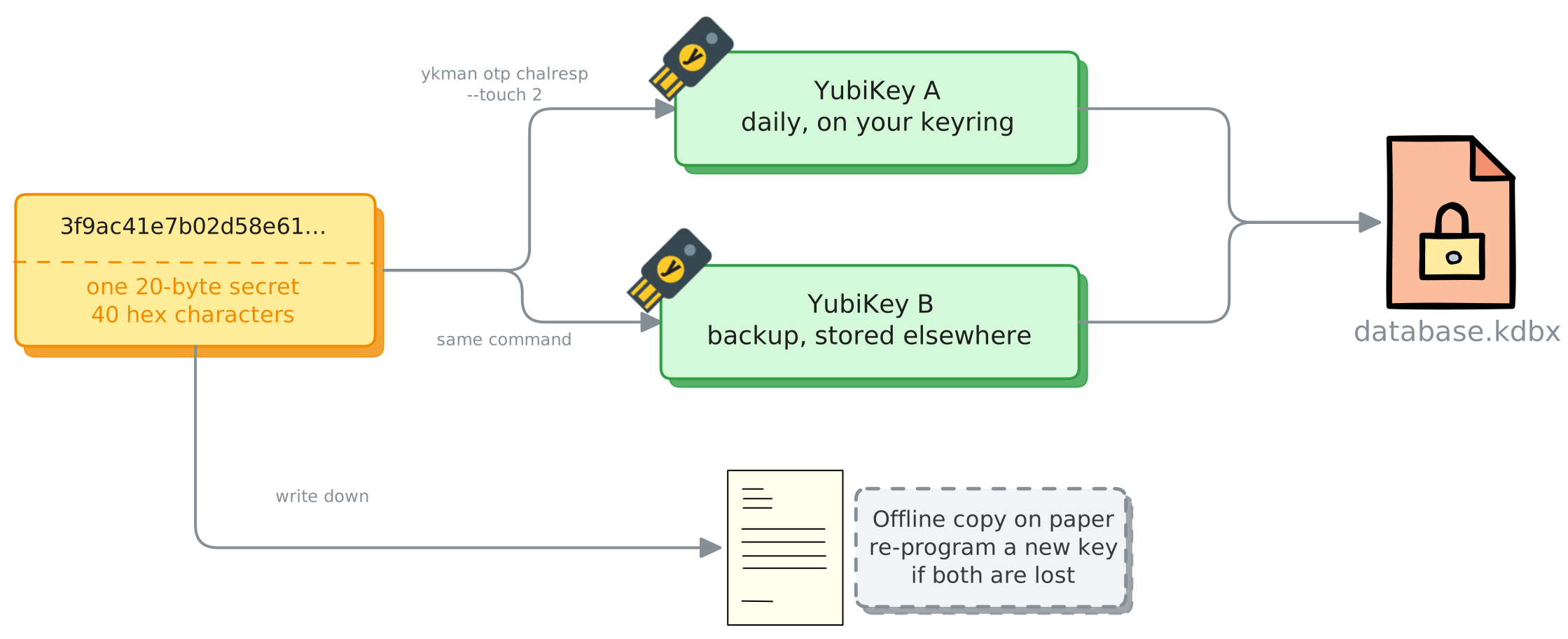
      One 20-byte secret is written to YubiKey A (daily) and YubiKey B (backup) with ykman otp chalresp --touch 2, and written down on paper. Either key opens database.kdbx. The paper copy lets you program a new key if both are lost.
      Two keys, one secret. Generate the secret yourself so it can be copied. Both keys then give the same response, and the paper copy covers losing both.

      Two YubiKeys, one secret

      Out of the box, slot 1 holds a Yubico OTP credential, so use slot 2. This overwrites whatever is in slot 2.

      # 20 random bytes as 40 hex characters. Store it offline.
      dd status=none if=/dev/random bs=20 count=1 | xxd -p -c 40
      
      # Plug in key 1, then run; repeat for key 2 with the same value.
      ykman otp chalresp --touch 2 <40-hex-secret>

      The --touch flag makes the key wait for a button press on each challenge (-t, --touch in the ykman reference). Do not use --generate: it creates a secret you cannot copy to the second key. The older ykpersonalize -2 -ochal-resp -ochal-hmac -ohmac-lt64 -oserial-api-visible -oallow-update -a<secret> route is the one in the KeePassXC guide.

      Nitrokey 3

      1. Install Nitrokey App 2 (2.2.2 or newer) or nitropy.
      2. In the Passwords tab, add a credential of type HMAC. The secret must be 20 bytes as 32 Base32 characters. It is visible only before you save, so copy it for the second key.
      3. Forum users set the slot from the command line: nitropy nk3 secrets add-challenge-response {1|2}.
      4. In KeePassXC (2.7.6 or newer), choose “Add Challenge-Response” and pick the Nitrokey.
      # one way to make a valid Base32 secret
      head -c 20 /dev/urandom | base32

      Firmware 1.5.0 or newer is needed. Firmware 1.9.0 had a CCID failure on Windows, fixed in 1.9.1.

      OnlyKey

      1. Each OnlyKey has a random HMAC key from first setup, so a single key works with no extra steps.
      2. For a backup, load the same custom key into both slots of both devices with the OnlyKey App.
      3. In KeePassXC, use “Add YubiKey Challenge-Response” and choose the OnlyKey.
      4. Before any firmware upgrade, remove challenge-response from each database, upgrade, then add it again. Skipping this can lock you out.

      The “HMAC User Input Mode” setting controls whether a button press is needed.

      Versions and Linux

      • KeePassXC 2.7.11 or newer. It fixed possible database truncation when saving with YubiKeys. The current release is 2.8.0 (21 October 2026).
      • Yubico and OnlyKey on Linux: install the udev rules for the device. The OnlyKey docs have a Linux page.
      • Nitrokey on Linux: needs pcscd running, a udev rules file, and libccid 1.5.0 or newer (the package is ccid on Arch). Check with pcsc_scan -r.
      • If a key is not detected, close KeePassXC, plug the key in, and start KeePassXC again. The Flatpak build is suggested by Nitrokey.
      • Quick Unlock is under Application Settings, Security. On Linux it needs 2.8.0 and polkit.

      Mobile. On iOS only the 5Ci (Lightning) or an NFC key works, and USB-C iPhones need Apple’s USB-C to Lightning adapter for the 5Ci. KeePassium’s AutoFill cannot talk to the key, so a protected database is unlocked in the main app first.

      Sources

      Gathered from vendor pages, project repositories and retailer listings in November 2026. Some pages were summarised rather than read in full.